Midjourney V6 Prompt Guide: 15 Formulas That Actually Work in 2026
Midjourney v6 changed the game. The old prompt tricks from v5 barely work anymore. Natural language is in. Keyword spam is out. We've been generating images with Midjourney since v4 and have tested thousands of prompts across every version. This guide covers what actually works right now.
We previously wrote a guide on how to get started with Midjourney. This article goes deeper on the craft of writing prompts that produce results you can actually use.
What Changed in Midjourney V6
Midjourney v6 (and v6.1) brought massive improvements over v5. Here is what matters:
- Natural language understanding. V6 reads full sentences. Write like you are describing a scene to a photographer, not stuffing keywords into a search bar.
- Text rendering. V6 can render text inside images. Put your text in "quotation marks" within the prompt. It is not perfect but it works for short phrases.
- Higher coherence. Hands, fingers, and faces are dramatically better. Still not flawless, but the jump from v5 is significant.
- Style tuning. You can now create custom style codes using
--styleand--sref(style reference) to lock in a consistent aesthetic. - Upscaling options.
--q 2is gone. Use the upscale buttons (U1-U4) then choose Subtle or Creative upscale for different results.
Anatomy of a Midjourney V6 Prompt
Every prompt has three parts. Master all three and you control the output.
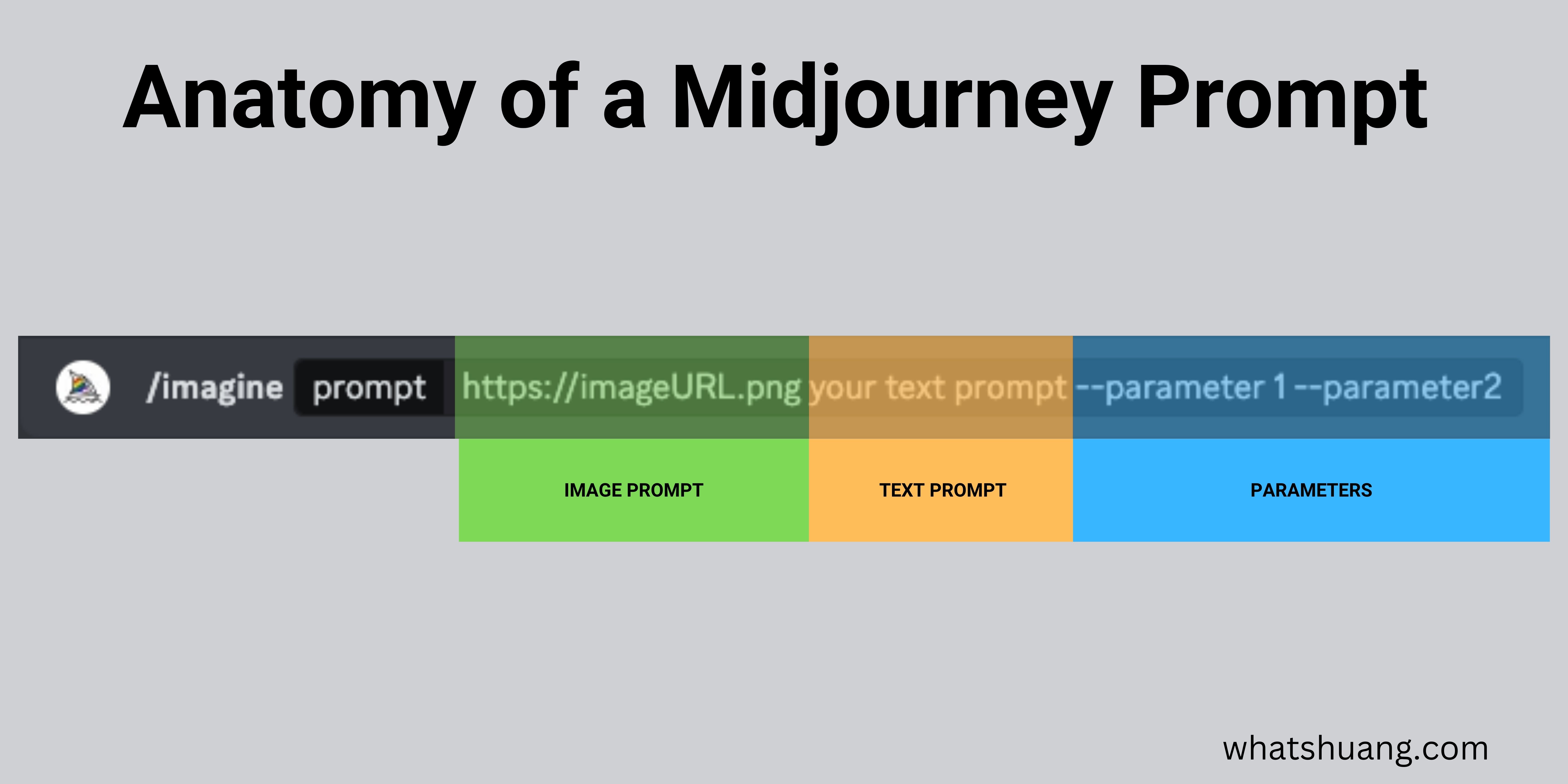
1. Image Prompts (Optional)
Drop image URLs at the front of your prompt. Midjourney uses them as visual references for composition, color, and style. You can use multiple images. Separate each URL with a space.
Pro tip: Combine an image prompt with --iw 2 (image weight) to make the reference image more dominant. Lower values like --iw 0.5 let the text prompt take over.
2. Text Prompt (Required)
This is your scene description. In v6, write in natural sentences. Be specific about what you want. Be clear about what the subject is doing, where they are, and how the scene looks.
V5 style (avoid this): mountain, night, stars, river, campfire, cinematic, 8k
V6 style (do this): A mountain range at night under a clear sky full of stars, with a small river reflecting moonlight and a campfire glowing on the riverbank
3. Parameters
Parameters go at the end after --. These control the technical output. Here are the ones we use constantly:
| Parameter | What It Does | Example |
|---|---|---|
--ar | Aspect ratio | --ar 16:9 for wide, --ar 9:16 for vertical |
--v | Model version | --v 6.1 |
--s | Stylize (0-1000) | --s 250 default, lower = more literal |
--c | Chaos (0-100) | --c 20 for mild variation |
--sref | Style reference URL | --sref [image URL] |
--cref | Character reference | --cref [image URL] |
--no | Negative prompt | --no text, watermark |
--tile | Seamless pattern | --tile |
--w | Weird (0-3000) | --w 500 for experimental looks |
15 Prompt Formulas That Work
These are battle-tested templates. Swap in your own subjects and details.
Formula 1: Product Photography
[product] on [surface], [lighting type] lighting, [background], shot with [camera], commercial photography --ar 4:5 --s 100
Example: A matte black coffee mug on a marble countertop, soft natural window lighting, blurred kitchen background, shot with a Canon R5, commercial photography --ar 4:5 --s 100
Formula 2: Cinematic Portrait
[subject description], [emotion/expression], [lighting], [environment], cinematic still, shallow depth of field --ar 16:9 --s 200
Example: A weathered fisherman in his 60s holding a net, stoic expression, golden hour side lighting, standing on a wooden dock, cinematic still, shallow depth of field --ar 16:9 --s 200
Formula 3: Editorial Flat Lay
overhead view of [items arranged on surface], [color palette], editorial flat lay photography, soft even lighting --ar 1:1 --s 150
Example: overhead view of a leather journal, fountain pen, espresso cup, and dried flowers arranged on a dark wooden desk, warm earth tones, editorial flat lay photography, soft even lighting --ar 1:1 --s 150
Formula 4: Architectural Visualization
[building type], [style], [time of day], [weather], architectural photography, [lens type] --ar 16:9 --s 100
Example: A minimalist concrete house with floor-to-ceiling windows, Japanese-inspired design, dusk with warm interior lights glowing, light fog, architectural photography, wide angle lens --ar 16:9 --s 100
Formula 5: Brand Hero Image
[person doing action] in [environment], [brand mood], [color scheme], editorial photography for [industry] --ar 16:9 --s 200
Example: A young woman coding on a laptop in a sunlit coworking space, confident and focused energy, muted blues and warm wood tones, editorial photography for a tech startup --ar 16:9 --s 200
Formula 6: Food Photography
[dish description], [plating style], on [surface/plate], [garnish], [lighting], food photography --ar 4:5 --s 150
Example: Seared salmon with crispy skin on a bed of risotto, elegant fine dining plating, on a dark ceramic plate, microgreens and lemon zest garnish, moody side lighting, food photography --ar 4:5 --s 150
Formula 7: Illustration Style
[subject] in the style of [art style], [color palette], [mood], illustration --ar 3:4 --s 300
Example: A fox sitting in an autumn forest in the style of Studio Ghibli watercolor, warm oranges and deep greens, peaceful and nostalgic, illustration --ar 3:4 --s 300
Formula 8: Abstract Background
abstract [pattern/texture type], [colors], [mood], seamless, high resolution --ar 16:9 --tile --s 400
Example: abstract flowing marble texture, deep navy and gold veins, luxurious and elegant, seamless, high resolution --ar 16:9 --tile --s 400
Formula 9: Social Media Graphic
"[text to render]" [visual context], [style], bold typography, [platform] format --ar 9:16 --s 100
Example: "SALE 50% OFF" on a vibrant gradient background with floating shopping bags, modern retail design, bold typography, Instagram Story format --ar 9:16 --s 100
Formula 10: Landscape Photography
[location/terrain], [time of day], [weather/atmosphere], [foreground element], landscape photography, [lens] --ar 21:9 --s 200
Example: Icelandic black sand beach, sunrise with pastel pink and purple sky, light mist, jagged basalt columns in the foreground, landscape photography, 24mm wide angle --ar 21:9 --s 200
Formula 11: Vintage/Retro
[subject], [decade] aesthetic, [film stock], [color treatment], vintage photography --ar 3:2 --s 250
Example: A couple dancing at a house party, 1970s aesthetic, Kodak Portra 400 film stock, warm faded colors with grain, vintage photography --ar 3:2 --s 250
Formula 12: Icon/Logo Concept
minimalist [subject] icon, [style], [color] on [background], clean vector style, centered --ar 1:1 --s 50
Example: minimalist mountain and sun icon, geometric, white on deep blue background, clean vector style, centered --ar 1:1 --s 50
Formula 13: Character Design
character design sheet of [character description], [art style], multiple poses and expressions, white background --ar 16:9 --s 200 --cref [URL]
Example: character design sheet of a cyberpunk street vendor with neon tattoos, anime art style, multiple poses and expressions, white background --ar 16:9 --s 200
Formula 14: Interior Design
[room type], [design style], [key furniture], [material palette], [lighting], interior design photography --ar 16:9 --s 150
Example: Open concept living room, Japandi design style, low walnut coffee table and linen sofa, wood and concrete material palette, large windows with afternoon sun, interior design photography --ar 16:9 --s 150
Formula 15: Macro/Close-Up
extreme close-up of [subject], [detail to emphasize], [lighting], macro photography, shallow depth of field --ar 4:5 --s 100
Example: extreme close-up of morning dew on a spider web, rainbow light refractions in each droplet, soft backlit golden hour, macro photography, shallow depth of field --ar 4:5 --s 100
Common Mistakes to Avoid
Keyword stuffing. V6 penalizes comma-separated keyword lists. Write sentences instead.
Being vague. "A cool photo of a city" gives you generic results. "A rain-soaked Tokyo alley at 2am, neon signs reflecting in puddles, empty except for one person with an umbrella" gives you something usable.
Contradicting yourself. Asking for "bright sunny day, dark moody shadows" confuses the model. Pick a direction.
Ignoring negative prompts. Use --no to exclude things you keep seeing. Getting unwanted text? Add --no text, words, letters, watermark.
Maxing out stylize. High --s values (800+) make images look "Midjourney-ish." Drop it to 50-150 for more realistic, literal results.
Forgetting aspect ratio. The default 1:1 square rarely matches what you need. Always set --ar for your use case:
- Blog headers:
--ar 16:9 - Social stories:
--ar 9:16 - Portraits:
--ar 3:4
Advanced Techniques
Style References (--sref)
Upload or link an image and use --sref [URL] to match its visual style. This is huge for brand consistency. Generate one image you love, then use it as a style reference for every subsequent image.
Character References (--cref)
Use --cref [URL] to maintain the same character across multiple images. Perfect for creating consistent mascots, avatars, or recurring characters in a series.
Multi-Prompts with Weights
Separate concepts with :: and assign weights. Higher numbers get more emphasis.
cyberpunk city::2 rainy night::1 neon reflections::1.5
This tells Midjourney to prioritize the cyberpunk city, then neon reflections, then the rain.
Permutation Prompts
Use curly braces to generate variations in one command:
A {red, blue, green} sports car on a mountain road --ar 16:9
This creates three separate jobs, one for each color. Massive time saver for exploring options.
In Conclusion
Midjourney v6 rewards specificity and natural language. Ditch the keyword lists. Write prompts like you are briefing a photographer. Use parameters to control the technical output. Use style and character references for consistency. Start with our 15 formulas, then adapt them to your own needs. The best prompt engineers are not the ones who memorize tricks. They are the ones who can clearly describe what they see in their head.
If you want to explore other image generation tools, check out our Stable Diffusion prompt guide or our breakdown of the best text-to-image AI tools.
Related articles: Stable Diffusion Prompt Guide · How to Use Midjourney on Your Website · Best Text-to-Image AI Tools
Author
Want more like this?
I write about AI implementation, automation, and growth marketing. No hype.